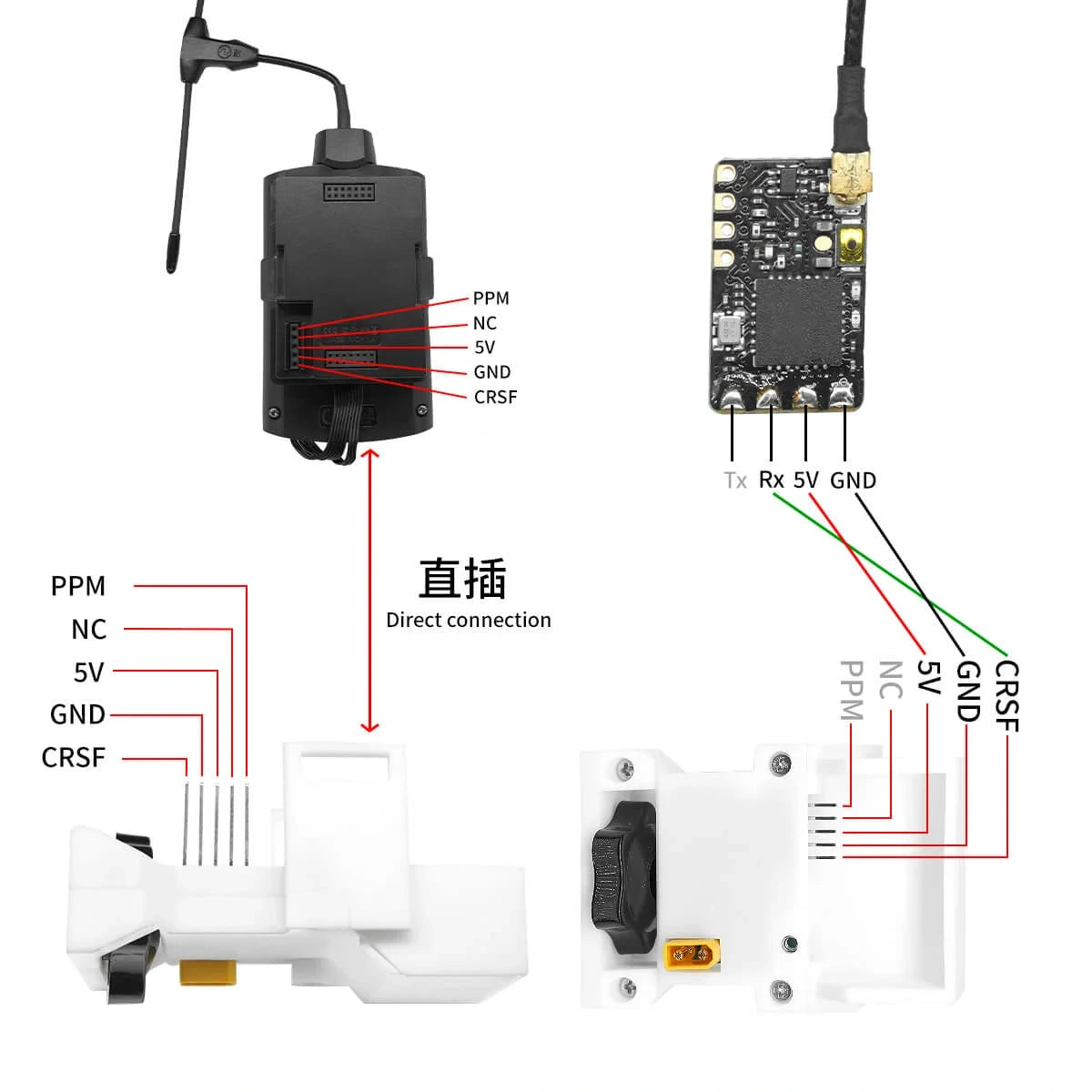
The DolphinRC RC Link Transponder is designed to relay RC control signals between compatible receivers and transmitters, making it a useful solution for extending or repositioning your radio control link.
Supporting ExpressLRS (ELRS) and TBS Crossfire (CRSF) systems, the transponder allows you to connect a receiving radio link to a separate transmitting module using CRSF or PPM protocols.
For optimal performance, we recommend using different frequencies for the receiving and transmitting links to minimise interference.
Key Features
-
Compatible with ExpressLRS (ELRS) and TBS Crossfire systems
-
Supports CRSF and PPM receiver inputs
-
Supports CRSF output for ELRS transmitter modules
-
Supports CRSF or PPM for compatible TBS transmitter modules
-
Operates from a 2S–6S power supply
-
Integrated 5V 3A BEC
-
Suitable for custom RC signal relay and repeater applications
Technical Specifications
| Specification |
Details |
| Brand |
DolphinRC |
| Product |
RC Link Transponder |
| Input Voltage |
2S–6S |
| BEC Output |
5V / 3A |
| Receiver (RX) Protocols |
PPM / CRSF |
| ELRS Transmitter (TX) |
CRSF |
| TBS Transmitter (TX) |
CRSF / PPM |
| Compatible Systems |
ExpressLRS / TBS Crossfire |
Recommended Radio Configuration
For reliable operation, we recommend using different frequency bands for the receiving and transmitting links.
Example configuration:
Using separate frequency bands helps reduce interference between the two radio systems.
ExpressLRS-to-ExpressLRS Setup Guide
When using ExpressLRS for both the receiving and transmitting links, configuration is relatively straightforward.
Step 1 – Configure the Receiver (RX)
The ExpressLRS receiver generally does not require any hardware configuration changes.
Connect the receiver to the transponder using the appropriate CRSF connections.
Step 2 – Locate the Transmitter Module UART
The ExpressLRS transmitter module requires access to a UART connection.
UART availability and location depend on your transmitter module.
Examples:
Refer to your transmitter module's hardware documentation before making any modifications.
Step 3 – Access the ExpressLRS Hardware Configuration
-
Power on the ExpressLRS transmitter module.
-
Enable Wi-Fi mode.
-
Connect your phone or computer to the ExpressLRS Wi-Fi network.
-
Open a web browser and navigate to http://10.0.0.1/hardware.
-
Locate the hardware configuration JSON file.
Step 4 – Configure the UART Pins
Update the hardware configuration to assign the CRSF serial connection to the required UART pins.
For the specified configuration:
-
RX Pin: GPIO 3
-
TX Pin: GPIO 1
These settings replace the existing SPort assignment where supported.
Important: GPIO assignments vary between ExpressLRS hardware designs. Verify that these pins are available and correctly mapped on your particular transmitter module before making changes.
Step 5 – Connect the UART
The UART connection uses four connections:
| Connection |
Function |
| RX |
Serial Receive |
| TX |
Serial Transmit |
| + |
Positive Supply |
| – |
Ground |
Connect the UART to the corresponding compatible receiver or transmitter interface to establish the relay connection.
Ensure the TX and RX signal lines are connected to their corresponding opposite inputs, and verify the correct operating voltage before applying power.
Important Notes
-
Use different radio frequency bands for the receiving and transmitting links wherever possible.
-
Confirm UART pin assignments before modifying ExpressLRS hardware settings.
-
Check voltage compatibility between connected devices.
-
Some transmitter modules may require internal access or additional wiring.
-
Configuration may vary depending on the ExpressLRS firmware version and transmitter hardware.
Please note: This product is intended for users familiar with RC radio systems, UART wiring and ExpressLRS configuration. Some technical setup may be required.
Rising Sun FPV – Product Information
For assistance with compatibility or configuration, contact our team at Rising Sun FPV.